If naming and caching are the 2 most difficult tasks in software engineering, then perhaps sizing up connection pools might take third place. Pool size depends on numerous easy-to-miss factors and it’s often the saner alternative to stick to defaults rather than pool-maxxing.
Let’s get the basics right
A connection pool is a group of connections established between your application and your database. When your application receives multiple incoming requests, it runs queries against your database by queueing them up and allowing the connections from the pool to pick it up one by one.
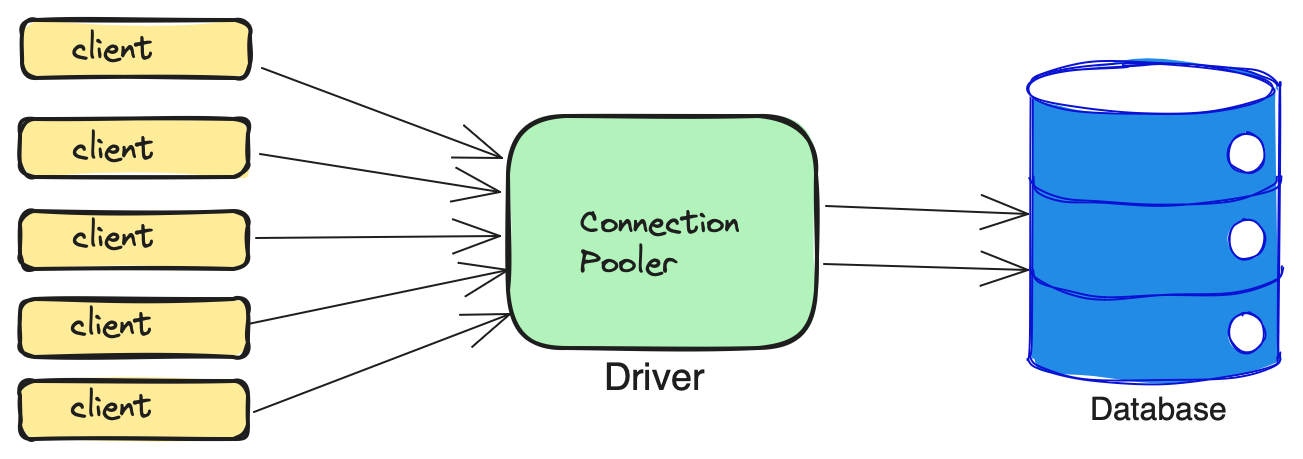
The primary reason for using connection pools to reduce the overhead of opening and closing connections as it involves DNS lookup, TCP handshake, authentication, session initialization and corresponding cleanup and memory deallocation jobs.
So how are these pools initialized ?
The details of connection pooling across JVM languages, Golang, Node and Python are actually dependent on how different runtime models dictate how database connections are allocated, managed and released.
Java
In JVM based languages, the golden standard at the time of writing is Hikari Connection Pooler, the default of the SpringBoot ecosystem. This is a highly optimized connection pooler that is build for multi-threaded architectures of the modern era.
- When a request comes in, a Java
virutal threadis spawned that requests a connection from the pool. - HikariCP avoids the overhead of the Java collections and leverages thread-local caching. When requesting for connection, there is zero synchronization overhead.
- It utilizes
lock-free atomic operationsto minimize thread contention with multiple threads are trying to check out connections simultaneously.
Golang
In Golang, connection pooling is handled out-of-the-box by it’s standard library database/sql.
-
Go relies on
M:Nscheduler, thus thousands of goroutines are multiplexed onto a few OS threads. WHen a Goroutine callsdb.Query(), it requests a connection from the pool. -
Under the hood, Go’s
sql.DBmanages the pool using a mutex lock to protect the state of the pool structure of idle connections. If a goroutine requests a connection and none are available, then the request is queued. -
You do not need to manually check-in or check-out if you are using the default driver. However, if you are using pgxpool then you can use
.Aquire()and.Release()if you are running multiple queries as part of a transaction. However, when you are running single queries, then there is no need to do this.
The overall architecture within Go is native to the language design.
Node (JavaScript)
Now, in Node.js which operates on a single-threaded event loop utilizing asynchronous I/O, connection pools like node-postgres or mysql2 are designed around non-blocking async queues.
-
The allocation is event driven. When an async block of code requires a DB operation, it makes a call to the pool.
-
If all connections in the pool are busy executing I/O, then Node.js pushes incoming database requests into an
internal memory queue. -
While the database is processing queries over the network sockets, the Node.js event loop is completely free to handle other incoming HTTP requests. When a database socket emits a
readable/dataevent, the event loop picks up the response and resolves the corresponding JS promise.
Python
Finally, when we take a look at Python, things hit the fan :)
Python’s entire ecosystem is fractured between synchronous libraries like psycopg2 and SQLAlchemy and asynchronous libraries like asyncpg and Tortoise ORM. It is difficult to share code between them.
In synchronous Python, which usually involves Django and Flask that runs on the
Web Server Gateway Interface (WSGI) like Gunicorn, the connection pooling is
managed per-thread.
-
Frameworks and ORMs maintain a pool of connection which is requested by the web server.
-
There is a Global Interpreter Lock (GIL) which ensures that only one Python thread executes bytecode at a time. This means, you cannot use multi-core CPU for CPU-bound tasks. You are forced to run sequentially, rendering multi-threading ineffective for performance gains.
-
To get around
GIL, Python apps are usually deployed using multiple processes like 4 Gunicorn workers. Now, we know that connection pools cannot be shared across OS processes. So if you have 4 processes with a pool size of 10, then you have 40 DB connections.
Auto-scaling becomes a nightmare because if you start-off more instances of your app then the result looks like
10 server instances × 4 workers each × 10 conns each = 400 DB connections!
However, if you are using asyncio with frameworks like FastAPI or Sanic, which
run on Asynchronous Server Gateway Interface (ASGI), Python starts handling
the connection pool similar to Node.js
-
Async Python runs on a single-threaded event loop. When a
coroutineneeds to query the database, it usesawait pool.acquire() -
While the database executes the query over a socket, the Python event loop moves on to handle other web requests.
-
There is heavy utilization of context managers to manage pool state and prevent leaks.
What to calculate an optimal pool size ?
A formula from the PostgreSQL docs that has held up the test of time -
connections = (core_count × 2) + effective_spindle_count)
Today, with SSDs in place, your effective_spindle_count is almost 0. So on a
machine with 8 cores, a connection pool size of 16 is optimal and 20 is the best
starting point without spending any serious time context-switching.
Best practices
If you are dealing with Postgres, then using pg_bouncer makes a lot of sense only if you have multiple applications that are competing for database resources. Otherwise, allowing the application to directly connect to the database is the optimal approach.
In some situations, have a dedicated data access layer talk to pg_bouncer
is better than having apps directly talk to it. The data access layer can be
decoupled and help out with ease in setting up caching databases and can
communicate with the application code over an event bus.
Serving 500 requests 20 at a time is faster than 100 at a time.
This is one of the most counter-intuitive realities of database engineering. It sounds like a paradox but under the hood it comes down to how your hardware is handling concurrency.
Here’s why 20 beats 50:
- An 8-core CPU can only execute 8 instructions at the exact same physical millisecond.
- When 20 connections are fighting for 8 cores, the CPU can switch between them with minimal friction and spending 100% of the time executing SQL query.
- When 50 connections are screaming for the same 8 cores, the CPU starts spending a massive percentage of it’s clock cycles just saving, swapping and loading process states.
Additional section if you read till this far :)
Overclocking connection pools (a Postgres example)
By default a PostgreSQL server has a max_connections of 100 and you are trying
to increase it to 150 then you are not just changing a number in the postgresql.conf.
You are essentially increase the footprint of the DB across your server’s entire
hardware resource.
The three primary pillars to deal with are - RAM, CPU and IO
1. RAM Calculation: Critical Factor
Each Postgres backend process consumes a baseline amount of memory, plus whatever memory is allocation for running queries.
You need to calculate your memory scaling based on two primary configuration parameters:
shared_buffers: The pool of memory shared by all connections for caching data is usually 25% of RAM.work_mem: The amount of memory used by a single internal sort of hash ops within a query before it writes to temporary disk files. Crucially, a single complex query might use multiple times this amount.
max_memory_risk = shared_buff + (max_conn × work_mem × ops_per_query)
- At 100 connections with a
work_memof 64MB, your connection-specific memory risk is up to 6.4GB, but at 150 connections, this jumps to 9.6GM!
2. CPU Scaling
8 cores can easily handle 150 idle connections, but when a traffic spike comes and all connections become active at the exact same time, the 8-core CPU chokes!
The way to scale CPU:
- If your workload is highly concurrent but consists of short, fast queries, scaling to 16 cores will provide the necessary bandwidth to handle the increased process scheduling without severe context-switching latency.
- If you cannot scale the CPU, you must use an external connection pooler like
pg_bounceris front of Postgres. PgBouncer can accept thousands of application connections but routes them into a tight, highly efficient pool of just 15 to 20 actual DB connections, saving your CPU from melting.
3. I/O (Disk Speed)
The more number of connections generally mean more concurrent read/write ops. If you scale your server’s compute and RAM but leave it on low-IOPS storage then the extra connections will be stuck on “disk wait” state!
When it comes to cloud providers, increase in storage volume must be accompanied
IOPS along with server size. Moving from 8 cores to 16 cores ideally should
be accompanied by a boost to atleast 3,000 to 5,000 provisioned IOPS (fast NVMe drivers)
to handle the increased concurrent write-ahead logging (WAL) and data flushing.